
SEO
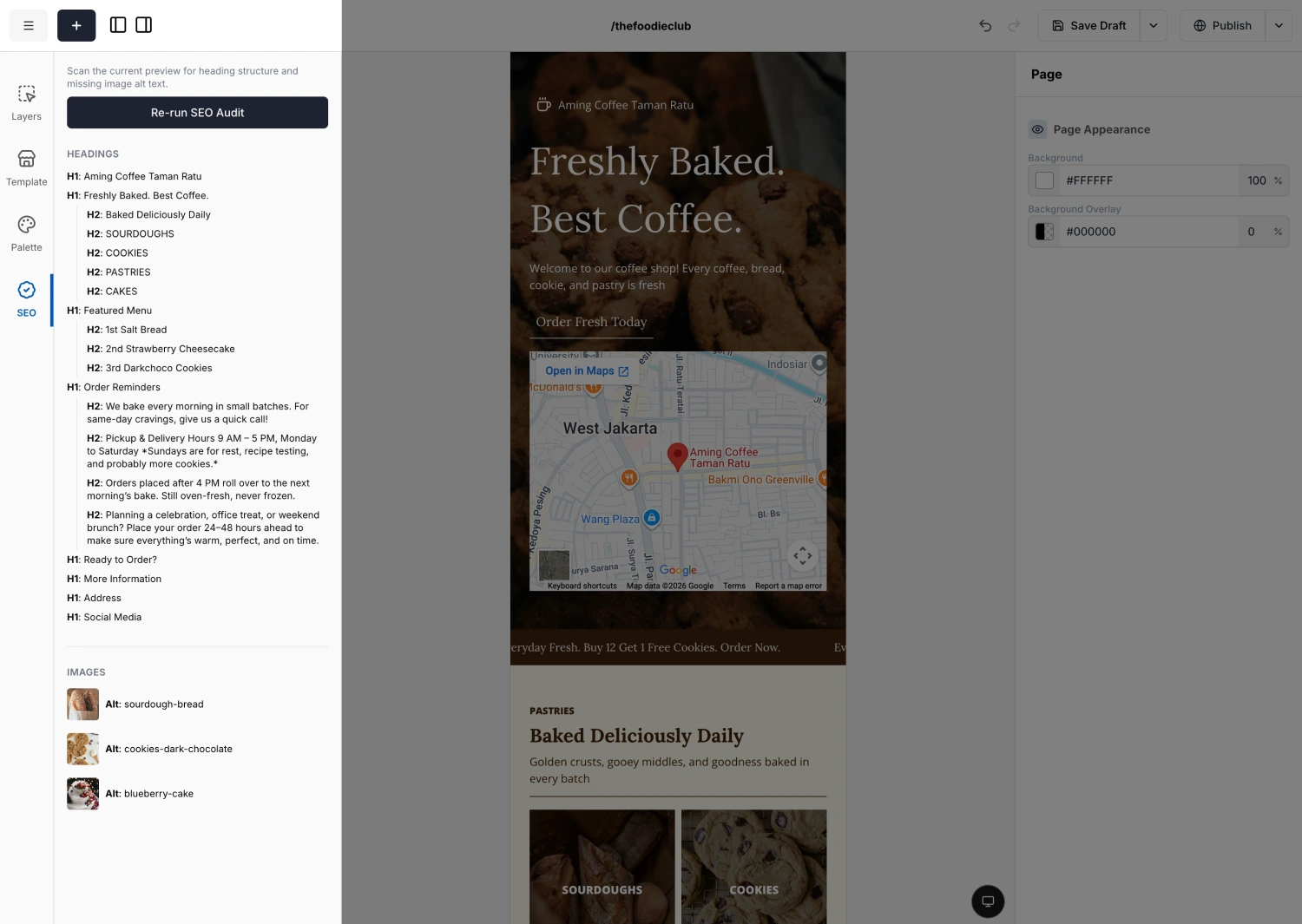
The SEO panel is a quick health check for your page. It scans what you have built and flags two things that matter for search engines and accessibility: your heading structure and your image alt text.
This panel does not set your page title, description, or icon. Those live in Page Settings. Use this tab to check the page structure before publishing.
Running an audit
Press Run SEO Audit. You get two sections:
Why it matters
Best practices
Headings
Choose a heading's level by its role on the page, not by how big you want it to look. Set the look separately with Typography.
Keep them in order (H1, then H2, then H3) and do not skip a level. Set the level in the Text block's Tag field.
Alt text
Describe what the image shows, briefly and specifically, as if to someone who cannot see it.
- Be specific. "Black leather tote bag on a wooden table" beats "bag".
- Keep it to about one sentence.
- Do not start with "image of" or "photo of". A screen reader already says it is an image.
- If the image contains words (a logo or a poster), include that text.
- Write for a person, not the search engine. Skip keyword stuffing.
- Purely decorative images (a divider or a background shape) do not need descriptive alt text.
Set alt text in the Image block's Alt text field.
Run the audit right before you publish. Fix any flagged headings or missing alt text, then Publish.